
.svg)
Prerequisites
- An active Whisper API account
- Your API key (get it at dash.whisper.security)
- curl, or your preferred HTTP client
Step 1: Get Your API Key
- Sign up at dash.whisper.security
- Navigate to API Keys in your dashboard
- A default API key is automatically generated for you. You can create more keys by clicking on Generate Key
- Copy your key
⚠️ Keep your API key secure! Never commit it to source control or expose it in client-side code.
Step 2: Make Your First Request
Let's enrich an IP address to see what Whisper can do:
curl -X GET "https://api.whisper.security/v1/indicators/ip/8.8.8.8" \
  -H "Authorization: Bearer YOUR_API_KEY" \
  -H "Accept: application/json"
Response (Truncated):
{
  "query": {
    "type": "ip",
    "value": "8.8.8.8",
    "timestamp": "2025-10-30T17:48:54.176776401Z",
    "response_time_ms": 3400
  },
  "summary": {
    "organization": "level 3",
    "location": "mountain view, United States",
    "network": "8.8.8.0/24",
    "registrar": null,
    "status": null,
    "asn_primary": "15169",
    "risk_score": 85.5,
    "ip_type": "residential",
    "total_domains": 99,
    "domain_name": null,
    "registration_date": null,
    "expiration_date": null,
    "dns_provider": null,
    "total_links_in": null,
    "total_links_out": null
  },
  "geolocation": {
    "ip": "8.8.8.8",
    "country": {
      "iso_code": "US",
      "name": "United States",
      "confidence": null
    },
    "city": {
      "name": "mountain view",
      "original_name": "Mountain View",
      "confidence": null
    },
    "location": {
      "latitude": 37.4223,
      "longitude": -122.085,
      "accuracy_radius": null,
      "time_zone": "America/Los_Angeles"
    },
    "isp": {
      "name": "google llc",
      "organization": "level 3",
      "asn": 15169,
      "asn_organization": "google llc"
    },
    "traits": {
      "user_type": "hosting"
    }
  },
}
Step 3: Try Domain Intelligence
Now let's analyze a domain:
curl -X GET "https://api.whisper.security/v1/indicators/domain/google.com" \
  -H "Authorization: Bearer YOUR_API_KEY" \
  -H "Accept: application/json"
Response (Truncated):
The response contains detailed information about the domain's registrar, registration dates, DNS records, and associated IP addresses.
{
  "query": {
    "domain": "google.com",
    "timestamp": "2025-09-20T17:03:45.123456789Z",
    "response_time_ms": 125
  },
  "summary": {
    "registrar": "MarkMonitor Inc.",
    "creation_date": "1997-09-15",
    "expiration_date": "2028-09-14",
    "status": "active",
    "risk_score": 5.0
  },
  "whois": {
    "domain": "google.com",
    "registrar": {
      "name": "MarkMonitor Inc.",
      "iana_id": "292"
    },
    "registration": {
      "created": "1997-09-15T04:00:00Z",
      "expires": "2028-09-14T04:00:00Z"
    },
    "nameservers": [
      "ns1.google.com",
      "ns2.google.com"
    ]
  },
  "dns": {
    "a_records": [
      {"ip": "142.250.185.78", "ttl": 300}
    ],
    "aaaa_records": [
      {"ip": "2607:f8b0:4004:c07::71", "ttl": 300}
    ],
    "mx_records": [
      {"priority": 10, "host": "smtp.google.com", "ttl": 3600}
    ]
  },
  "infrastructure": {
    "ip_addresses": [
      {"ip": "142.250.185.78", "asn": "AS15169", "org": "GOOGLE"}
    ]
  }
}
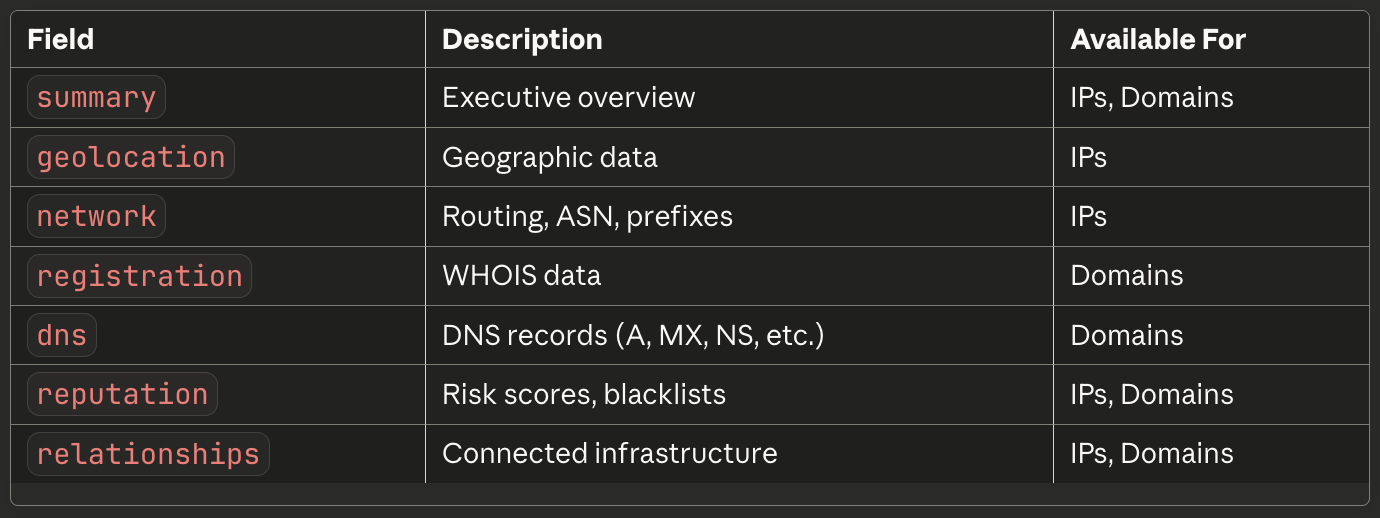
Understanding the Response
Every Whisper API response includes:
- query: Metadata about your request
- summary: Quick overview with key facts
- Detailed sections: Geolocation, network, DNS, reputation, etc.
- metadata: Data sources, freshness, processing time
Next Steps
Now that you've made your first calls, explore:
- Core Concepts - Understand Whisper's architecture
- API Reference - Complete endpoint documentation
- SDKs - Get started with your language
- Use Cases - Real-world examples